
NMEA 2000 network maintenance is less about replacing parts on a schedule and more about preserving a correct physical network. Loose connector collars, moisture, unsupported cables, weak power, missing terminators, or an improvised branch can create intermittent electronics problems that are difficult to reproduce at the dock.
A careful inspection before winter storage gives you time to document the network, correct physical damage, and establish baseline voltage and resistance readings. This guide applies to standard NMEA 2000 networks used by chartplotters, engine gateways, heading sensors, tank monitors, weather instruments, and other certified devices. Proprietary networks and NMEA 0183 wiring require different procedures.
Understand the Network Before Disconnecting Anything
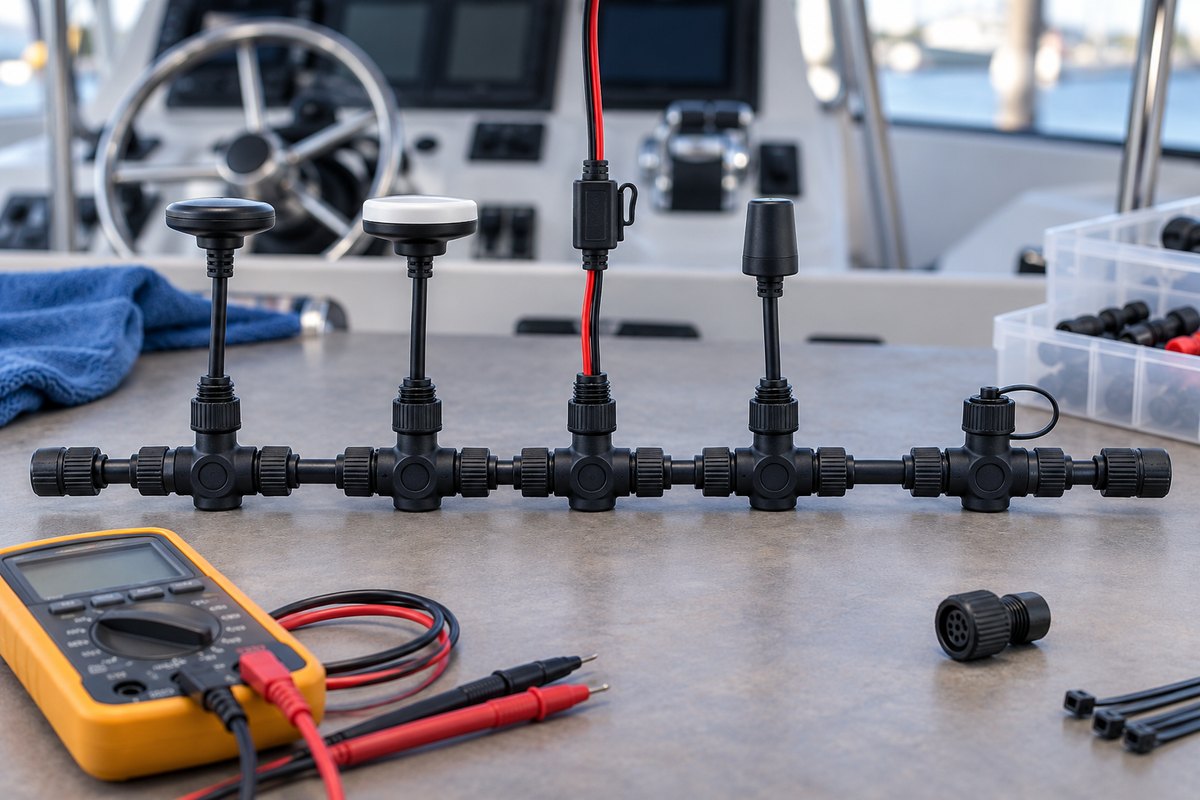
Garmin’s Technical Reference for NMEA 2000 Products describes a linear backbone: T-connectors and backbone cables form the main side-to-side path, while device drop cables and the dedicated network power cable attach to the top of the T-connectors. The backbone is terminated at both ends.
Before touching the network, make a simple diagram showing:
- Each connected device and its approximate location
- The path of the backbone
- Both terminators
- Every T-connector or multiport backbone block
- The network power-insertion point and fuse
- Any power isolator, gateway, or field-installable connector
- Cable lengths when they are known
Take overview and close-up photographs. The diagram becomes especially valuable when a cable disappears behind the helm or through a bulkhead. It also helps prevent a device from being reconnected to the wrong network or an old power feed from being overlooked after upgrades.
Power Down the Network Safely
Turn off the electronics circuit and verify that network-powered devices have shut down. Some boats feed the NMEA 2000 backbone from an electronics switch, while others use an independent breaker or fuse. A gateway or another device may also be capable of supplying network power.
Garmin specifies a dedicated NMEA 2000 power cable connected to a 12-volt DC source and warns against powering a network at more than one point unless a power isolator separates the feeds. Do not assume the chartplotter’s display going dark proves the backbone is de-energized. Verify the network’s actual power arrangement before performing resistance tests or opening connectors.
If the boat has 24-volt service, confirm that the NMEA 2000 feed uses the manufacturer-approved 12-volt supply or converter. Garmin warns that a source greater than 12 volts can damage connected network components or devices.
Inspect the Linear Backbone and T-Connectors
Follow the backbone from one terminator to the other. The normal small-network layout is a straight chain, even when the cable route bends physically around the boat. Inspect for:
- T-connectors joined side-to-side or separated by approved backbone cable
- Device drop cables connected to the top branches
- Tight connector collars that are fully seated but not damaged by excessive force
- Cracked housings, bent pins, cross-threaded collars, or missing seals
- Green or white corrosion, moisture, or salt residue
- Cable jackets cut by sharp edges or crushed by clamps
- Unsupported connectors hanging by the cable
- Tight bends or tension where the harness enters a connector
- Open ports that lack the correct protective cap
Do not route the backbone through the top of a standard T-connector. Garmin’s linear-backbone guidance reserves the side connections for the backbone and the top connection for a device drop or power cable.
If moisture or corrosion is present, stop and identify the source before reconnecting the network. Use only cleaning and sealing products approved by the connector or device manufacturer. General-purpose grease or contact cleaner can damage plastics, swell seals, trap contamination, or interfere with electrical contact.
Verify Both Backbone Terminators
A conventional NMEA 2000 backbone needs one terminator at each physical end. A terminator may resemble a short capped connector, and some compact network products incorporate termination in a specialized component.
Do not add a terminator simply because a device is missing from a display. First locate both ends of the backbone and identify the installed termination arrangement. Extra termination can be as disruptive as missing termination.
Garmin also documents in-line termination for installations where the last device location makes a final T-connector impractical. Follow the component manufacturer’s diagram rather than trying to make every network look identical.
Inspect the Power Cable, Fuse, and Ground Path
Trace the dedicated network power cable to its switch, breaker, or inline fuse. Check for:
- Correct fuse type and rating for the installed power cable
- Secure, corrosion-free positive and negative connections
- Proper strain relief and chafe protection
- Heat discoloration, damaged insulation, or poorly supported splices
- A second power insertion that lacks an appropriate isolator
- An electronics circuit that remains energized unintentionally during storage
Do not replace a fuse with a larger value to prevent nuisance opening. The power-cable manufacturer or device installation manual determines the required protection.
When field-installed terminals or ferrules are used on the supply side, inspect the conductor for full insertion, a correct crimp, and insulation support. Avoid solder or connector practices not approved for the specific terminal and marine wiring application.
Test Termination Resistance Only With Power Off
Actisense explains that two 120-ohm terminators in parallel normally produce a reading of approximately 60 ohms across the network’s NET-H and NET-L signal conductors. Its diagnostic guidance interprets approximately 120 ohms as one terminator and approximately 40 ohms as three terminators.
This is a useful baseline test, but it must be performed on a de-energized network with the correct breakout point or test adapter. Do not push meter probes into sealed connector sockets or short adjacent pins. Confirm the pin identification and test method for the connector system before measuring.
If the reading is wrong, do not immediately replace expensive displays or sensors. First verify that power is truly off, locate both intended terminators, check for a hidden third terminator, and inspect backbone joints. Record the measured value before changing the layout.
Check Network Voltage at the Source and Far Ends
Actisense recommends checking supply voltage at the insertion point and toward the extremities of the backbone because device load and cable resistance create voltage drop. Its published NMEA 2000 troubleshooting guidance uses 9 to 16 volts as the network operating range and calls for at least 9 volts at the tested end of the backbone. Garmin’s installation guidance requires a dedicated 12-volt source and warns against a source above 12 volts.
Treat those statements together: supply the network exactly as the installed equipment manufacturer specifies, then confirm adequate voltage under the boat’s normal operating load. Do not use a broad operating range as permission to connect the network directly to a nominal 24-volt system.
Use a proper diagnostic adapter or the documented procedure for temporarily accessing power conductors. If a terminator is removed for a test, restore it immediately afterward and verify the connector is sealed.
A large voltage difference between the power-insertion point and a backbone end can indicate excessive cable length, undersized or damaged supply wiring, loose connections, corrosion, or too much network load. Use the network’s device LEN values and the manufacturer’s voltage-drop calculation when evaluating design changes.
Respect Cable-Length and Device Limits
Garmin’s technical reference lists these limits for the network configuration it documents:
- No more than 100 meters (328 feet) between any two network points
- No more than 78 meters (256 feet) of total drop-cable length
- No individual drop longer than 6 meters (20 feet)
- No more than 50 connected devices
These are design limits, not targets. A small recreational boat should not need anything close to them. If extensions have accumulated through repeated upgrades, revise the network diagram and confirm that the backbone remains linear and the power distribution is balanced.
Power Up and Confirm Device Communication
After reconnecting and securing every component:
- Restore the two terminators and all protective caps.
- Support cables so their weight does not pull on connector bodies.
- Energize the electronics circuit.
- Confirm that expected devices appear in the chartplotter or network device list.
- Verify critical data such as position, heading, depth, engine information, and tank levels where applicable.
- Review the selected data sources if duplicate sensors are installed.
- Check for network alerts, intermittent device loss, or values that freeze when equipment is moved or switched.
A device appearing in the list does not prove every data message is present or that the display is using the intended source. If a specific value remains missing, compare the device’s transmitted PGNs, display configuration, and source selection before assuming a cable has failed.
NMEA 2000 Maintenance Checklist
- Draw or update the backbone and device diagram
- Photograph terminators, T-connectors, power insertion, and gateways
- Confirm the network is fully de-energized before resistance testing
- Inspect both end terminators and the linear backbone path
- Check connector collars, pins, seals, caps, and cable support
- Look for moisture, corrosion, chafe, crushing, and tight bends
- Verify one intended power source or documented power isolation
- Inspect the fuse, positive connection, and negative return
- Measure termination resistance with the approved power-off method
- Measure loaded voltage with a proper diagnostic adapter if needed
- Restore every terminator and cap after testing
- Confirm devices and critical data after powering the network
Record the Network Baseline in BoatDuty
Use BoatDuty to record the inspection date, the electronics configuration, fuse information, measured resistance, voltage at the power insertion point, and voltage at the tested backbone ends. Note the meter and adapter used, any connectors cleaned or replaced, and any device or PGN that was missing.
Keep the network diagram and photographs with the maintenance history. When a future chartplotter, sensor, or gateway is added, that baseline makes it much easier to identify what changed instead of rebuilding the network map during a failure.