

A mechanical boat steering cable can look simple, yet it connects every movement at the wheel to the engine, rudder or jet steering hardware. Stiffness that developed gradually during the season may feel normal to the operator, while corrosion at the output ram or a cracked cable jacket continues to worsen. A deliberate mechanical boat steering cable inspection before storage gives you time to identify unsafe wear and order the correct parts before launch season.
This article covers push-pull mechanical steering systems, including common rotary and rack-and-pinion arrangements. It does not apply to hydraulic steering, steer-by-wire systems or every jet-drive installation. Always identify the installed helm and cable, then follow the steering-system and engine manufacturer’s manuals. Steering is safety-critical; if the type, condition or assembly is uncertain, use a qualified marine technician.
Confirm That the Boat Has Mechanical Steering
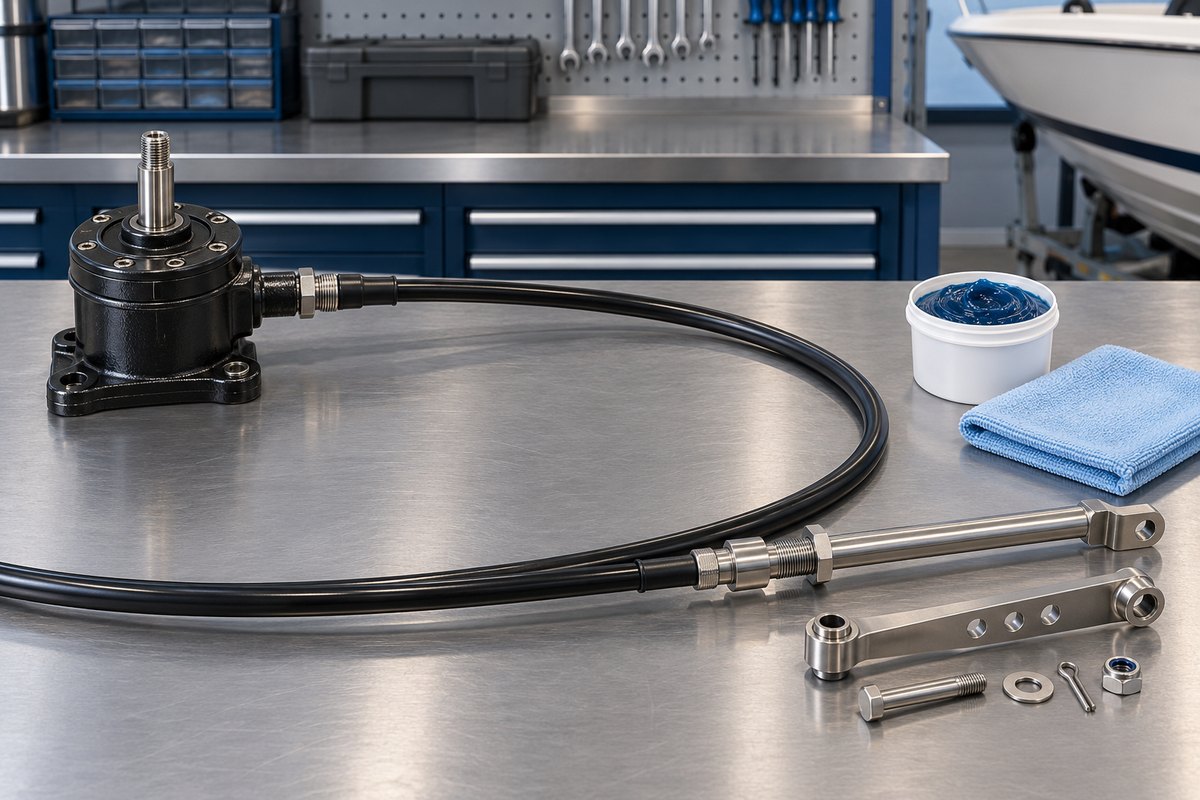
Look behind the helm and at the engine or steering connection. A mechanical system normally has a single heavy cable jacket leading from a rotary helm or rack to a metal output ram. An outboard installation often routes that ram through the engine’s tilt tube and joins it to the engine with a link arm.
Do not infer the cable family from appearance alone. Dometic SeaStar, for example, sells several mechanical cable designs, including rotary, rack-and-pinion, jet-boat and higher-performance configurations. The helm connection, cable end and application must match. Record the existing maker, model or stamped cable code before ordering anything.
If the boat uses two steering cables, do not convert it to a single-cable arrangement during service. Dometic warns that changing a dual-cable system to a single cable can create an unsafe boating condition. Replace components only with parts approved for the exact helm, engine, boat speed and installation.
Establish a Steering-Feel Baseline
With the boat securely supported, the engine off and the area clear, move the wheel slowly from lock to lock. Do not force the wheel against a stop. Note whether effort remains smooth and reasonably even through the full range.
Stop and investigate if you find:
- A hard spot, binding or a sudden increase in effort
- Grinding, popping or scraping at the helm
- Excessive free play before the engine or rudder responds
- A wheel that does not travel through the expected range
- A cable or wiring harness that tightens, rubs or moves with the steering
- Contact between the engine, transom, splashwell or steering hardware
One useful isolation test may require disconnecting the link arm so the engine and cable can be evaluated separately. That operation can allow an outboard to swing freely and exposes safety-critical fasteners. Follow the manufacturer’s procedure exactly or assign the test to a technician. Never improvise a disconnection while the boat is in the water or poorly supported.
Inspect the Cable Jacket Along Its Entire Route
Trace the steering cable from the helm to the output end wherever it is accessible. Use a light and mirror rather than pulling blindly on hidden runs. The jacket protects the internal cable and maintains the geometry required for push-pull operation.
Look for:
- Cracks, cuts, flattening, blisters or swelling in the outer jacket
- Abrasion where the cable crosses a bulkhead, clamp or equipment edge
- Tight bends, kinks or an unsupported loop that can move underway
- Corrosion or looseness at end fittings and retaining nuts
- Heat damage near exhaust components
- Chemical damage from fuel, solvent, battery electrolyte or aggressive cleaners
- Cable ties or clamps tight enough to crush the jacket
Dometic’s mechanical steering literature emphasizes controlled cable construction and protective outer jackets, while its XPA installation manual requires cable runs to remain secure and free from chafing, binding and kinks. A damaged jacket is not a cosmetic defect. Moisture and grit can enter, internal friction can rise and the cable may no longer operate predictably.
Do not tape over a split jacket and call it repaired. Dometic directs replacement when a mechanical steering cable shows stiffness, cracks or other damage. Steering cables are assembled components; field repairs, splices and forced lubrication into the jacket are not substitutes for the correct replacement.
Check the Output Ram, Tilt Tube and Link Hardware
At an outboard, inspect the exposed stainless output ram and the engine tilt tube. Salt, dried grease and corrosion in this area are frequent causes of rising steering effort.
First remove loose contamination with materials permitted by the manufacturer. Do not use abrasive tools that scratch the ram or aggressive chemicals that attack seals and stainless surfaces. Dometic warns that some fiberglass hull cleaners can aggressively corrode stainless shafts and advises rinsing overspray promptly with fresh water.
Check for:
- Rust staining, pitting or scoring on the output ram
- Hardened, contaminated or missing grease
- A damaged tilt-tube nut or cable-end threads
- A bent link arm or elongated hardware holes
- Missing washers, cotter pins or other locking devices
- A loose fastener or a locknut whose locking feature no longer engages
- Contact or binding through the full steering and engine-tilt range
Lubrication must be selective. Dometic instructs owners to periodically lubricate the cable output ram and engine tilt tube with waterproof marine grease. The same manual says the helm and cable assembly are supplied lubricated and warns not to add lubricant to those assemblies because an incompatible product can damage the cable and lead to seizure or premature wear. In short: service the exposed ram and tilt tube as directed, but do not pump grease, oil or solvent into the cable jacket or helm.
Use the exact grease, cleaning procedure and fastener torque specified for the installed system. Replace single-use locking hardware when the manual requires it. If a fastener, spacer or adapter arrangement differs from the parts diagram, stop and verify the installation before operating the boat.
Inspect the Helm Without Creating a New Problem
Behind the dashboard, confirm that the helm is securely mounted and that the cable connection is fully seated. Look for movement at the mounting bolts, corrosion, cracked brackets, loose fasteners and interference with wiring or control cables. Make sure nothing can wrap around the wheel shaft or restrict helm movement.
Avoid opening a sealed helm merely to “see what is inside.” Rotary and rack systems have model-specific assembly and retention features. Opening the wrong housing may release parts or disturb the cable connection. If the helm grinds, skips, slips or has excessive play after external fasteners are verified, replace or service it according to the manufacturer’s instructions.
A cable that is stiff with the link arm disconnected may be corroded internally or damaged along its route. An engine that remains stiff with the cable disconnected may have a pivot or swivel-bracket problem instead. Because both can feel similar at the wheel, proper isolation prevents replacing the wrong component.
Know When Replacement Is the Safe Answer
Replace or professionally evaluate the cable and related parts when you find:
- Stiffness, binding or uneven movement that cleaning the permitted external points does not correct
- Any cracked, cut, kinked, melted or badly abraded cable jacket
- Corrosion, pitting or bending on the output ram
- Damaged cable threads or retaining hardware
- Excessive backlash traced to the cable or helm
- An unidentified cable that cannot be matched to the helm and application
- Interference that cannot be corrected while preserving the required routing
- A helm that slips, skips or fails to move the output consistently
Cable length and part family matter. Do not choose a replacement by measuring only the visible jacket or buying the nearest nominal length. Use the installed cable marking and the manufacturer’s measuring instructions. A cable that is too short can bind as the engine turns or tilts; excessive length can create loops and bend-radius problems.
After replacement or reassembly, a technician should verify correct hardware, steering direction, full travel, free movement, fastener security and clearance through the entire steering and tilt range. Conduct an on-water operational check only after the dockside inspection passes.
Mechanical Steering Cable Inspection Checklist
- Identify the helm type, cable family and installed cable marking
- Turn the wheel slowly through its full range without forcing the stops
- Record stiffness, hard spots, noise, free play and travel
- Trace the accessible jacket for cracks, abrasion, heat damage and tight bends
- Confirm the cable is supported without crushing or chafing
- Inspect the output ram for corrosion, pitting, scoring and bending
- Check the tilt tube, link arm and locking hardware against the parts diagram
- Verify clearance through the full steering and engine-tilt range
- Clean and lubricate only the points and products specified in the manual
- Never force lubricant into the cable jacket or sealed helm
- Replace a stiff, cracked, kinked or otherwise damaged cable
- Complete a dockside functional check before launch
Record Steering Condition in BoatDuty
Mechanical steering wear is easier to recognize when observations are comparable. In BoatDuty, record the date, engine hours, cable maker and code, helm type, steering effort and any free play or hard spots. Note the waterproof marine grease used on approved external points, the condition of the ram and jacket, hardware replaced and the technician’s findings.
If a replacement is planned, record the full part number, marked cable length and the reason for removal rather than relying on memory in spring. Photos of the cable marking, helm connection and link hardware can also make parts verification faster.
A smooth wheel is not the only standard. The jacket, output ram, helm and locking hardware must work as one intact system. Inspecting them before storage turns a gradual change in steering feel into a documented maintenance decision—while there is still time to make the repair correctly.