
Marine radar maintenance before winter storage is less about opening the scanner and more about protecting the installation around it. A secure mount, watertight cable entry, clean power supply, intact network connection, and documented performance baseline can prevent a spring launch from beginning with a blank radar screen or an unreliable target picture.
The correct procedure depends on the radar model. A compact solid-state radome, a magnetron radome, and an open-array scanner have different service limits and safety requirements. Use this guide as a structured inspection, then follow the scanner and chartplotter manuals for model-specific cleaning products, fastener torque, cable service, software, and storage instructions.
Treat the Radar as Energized Equipment Until It Is Isolated
A marine radar transmits radio-frequency energy. Some scanners also contain high-voltage circuits that are not made safe simply because the antenna is no longer rotating or the chartplotter says “standby.” Garmin’s installation safety guidance requires people to remain clear of the radar beam while transmitting, and it warns that opening certain units can affect safety and warranty coverage.
Before touching the scanner, mount, or cables:
- Put the radar in standby and shut down the chartplotter normally.
- Open the radar’s dedicated breaker or remove power using the boat’s approved isolation method.
- Confirm that an open array cannot start rotating.
- Keep the scanner housing closed unless the manufacturer’s service manual expressly authorizes owner access.
- Do not apply power while a connector is partly engaged or while someone is in the beam path.
Internal magnetron, motor, antenna, and electronics work belongs to a qualified marine-electronics technician unless the manufacturer has supplied an applicable field-service procedure and the person performing it is trained to use it.
Identify the Installation Before Inspecting It
Record the radar manufacturer, model, serial number, scanner type, approximate installation date, chartplotter model, and software versions. Note whether data travels over a wired marine network or a model-specific wireless link. Photograph the mount, cable route, deck gland, and power connection.
This matters because apparently similar radomes can use different mounting hardware, connector arrangements, torque values, and network adapters. For example, current Garmin GMR HD3/xHD3 instructions specify particular mounting rods, washers, anti-seize, sealant, and tightening torque for those models. Those values should not be copied to an unrelated radar.
Capture a Performance Baseline Before Haulout
If the radar is still operational and conditions allow a safe test, run it before winter layup. A short, documented baseline makes spring troubleshooting much easier.
- Verify that the area around the scanner and its beam is clear.
- Start the boat’s electrical system in its normal operating configuration.
- Observe radar startup time and any alarms or network messages.
- Check target returns at short, medium, and longer ranges using fixed, known objects.
- Compare the radar image with the chart and visible shoreline where practical.
- Note unusual bands, blind sectors, intermittent blanking, excessive noise, bearing error, or a scanner that disappears from the network.
- If radar overlay is used, verify that heading information is available and that the overlay is reasonably aligned.
Do not “correct” an offset merely because one target looks unusual. Heading-sensor errors, GPS-derived course, vessel yaw, obstructions, sea clutter, and installation alignment can all affect the picture. Save the symptoms and conditions first; make installation changes only after following the model’s commissioning procedure.
Inspect the Radome or Open Array Exterior
With power isolated, examine the scanner from a safe, stable working position. Never climb or lean from an unsupported roof edge.
Look for:
- cracks, impact marks, loose seams, distortion, or water staining on a radome;
- chalking, heavy oxidation, bird deposits, salt, soot, or residue that could hide damage;
- missing or loose exterior screws, covers, caps, or cable-retaining pieces;
- corrosion where dissimilar metals meet;
- evidence that rigging, canvas, lights, antennas, or stored equipment has rubbed the housing;
- on an open array, visible damage to the array and pedestal without forcing the antenna to turn.
Clean only as directed by the radar manufacturer. A soft cloth, fresh water, and a mild detergent are commonly appropriate for marine electronics, but solvents, abrasive pads, pressure washing, waxes, or aggressive cleaners can damage plastic and seals. Do not paint a radome unless its manufacturer specifically permits a compatible coating; unsuitable materials or metallic pigments can degrade radar performance.
Check the Mount, Platform, and Fasteners
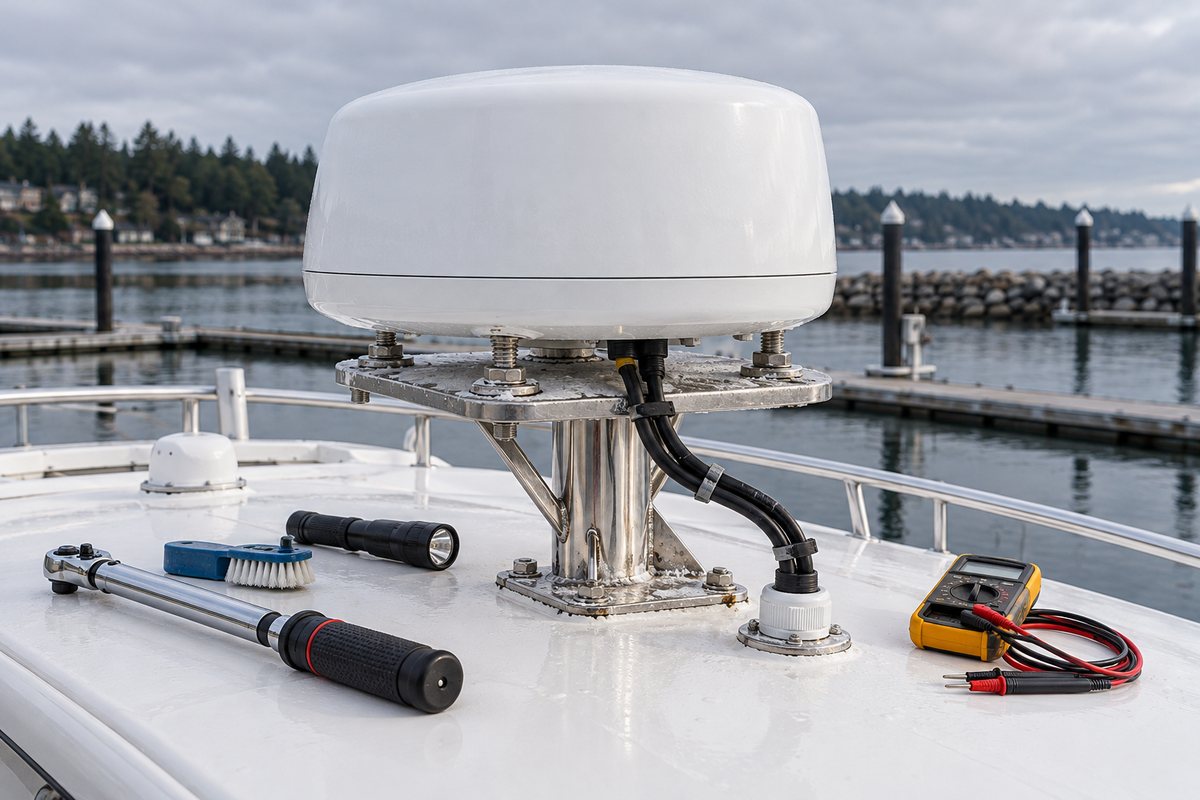
The scanner depends on a rigid, stable, free-draining platform. Raymarine’s installation guidance notes that a platform should support the scanner’s mass and inertia without twisting, vibration, or shock. Garmin likewise calls for a flat, sturdy mounting surface.
Inspect the complete load path:
- scanner base to its pedestal or bracket;
- pedestal or bracket welds, gussets, and mounting feet;
- fasteners, flat washers, lock washers, nuts, and any approved locking method;
- hardtop, arch, mast, or backing structure beneath the mount;
- sealant around fastener penetrations;
- drainage around the scanner base and platform.
Watch for elongated holes, cracked welds, compressed laminate, rust trails, loose nuts, lifted sealant edges, fretting marks, or movement when the assembly is gently checked. Do not use the radome itself as a lever. If fasteners have loosened, find the cause before tightening them. A flexible platform, crushed core, failed bedding, wrong hardware, or vibration will not be corrected by additional torque.
Use the model’s installation instructions for torque and hardware stack-up. Do not substitute a generic torque chart: thread treatment, stud size, mounting thickness, washer arrangement, and the supporting laminate all affect the correct value.
Inspect Cables, Connectors, and Deck Penetrations
Radar power and data cables often spend years exposed to ultraviolet light, vibration, salt, and tight bends. Inspect every accessible section without pulling on the connector.
Check for:
- chafe, flattened insulation, cuts, swelling, discoloration, or a stiff outer jacket;
- unsupported cable weight hanging from the scanner connector;
- bends tighter than the manufacturer allows;
- loose clamps, failed ties, or sharp metal edges;
- connectors that are not fully seated or locking rings that have backed off;
- green or white corrosion, moisture, or heat discoloration at accessible connections;
- deck glands and bulkhead feed-throughs with cracked seals or lifted bedding;
- routes through bilges, doors, hot spaces, or moving equipment.
Garmin’s current installation instructions direct installers to minimize cable bending or twisting, secure cables at the scanner, and tighten connector locking rings. Raymarine recommends clamping cables, protecting them from heat and physical damage, and using a watertight feed-through at an exposed bulkhead or deckhead.
Do not cut, splice, grease, or replace a proprietary radar connector based on appearance alone. Use only treatments and repair methods approved for that cable system. A connector can look clean while a conductor has fractured inside the jacket, so intermittent faults may require voltage, continuity, or network testing by a technician.
Verify the Power and Network Side
An apparent scanner failure can originate elsewhere in the boat. Raymarine troubleshooting guidance specifically calls for checking battery voltage, battery terminals, power cables, connection security, cleanliness, and corrosion.
Inspect the radar breaker, fuse, power distribution point, negative return, and accessible network ports. If testing is within your skill level, compare supply voltage at rest and during radar startup with the limits in the manual. A normal no-load reading does not rule out excessive voltage drop under load.
For a wired installation, confirm that network connectors are locked and supported. For a wireless-capable scanner, record the approved pairing information and confirm software compatibility before changing settings. Never place passwords or sensitive pairing information in a public maintenance note.
If the radar repeatedly restarts, disappears from the network, or fails only when transmitting, record the battery state, engine status, voltage reading, range setting, and error message. That evidence is more useful than replacing parts at random.
Review Alignment, Obstructions, and Nearby Equipment
Winter inspection is a good time to notice changes around the scanner. New antennas, lights, mast hardware, storage cradles, canvas frames, or solar equipment can create obstruction, shadow sectors, heat exposure, or cable interference.
Confirm that:
- the mount remains aligned with the vessel as installed;
- the scanner has not shifted on the platform;
- drainage is open and standing water cannot collect beneath it;
- no new item crosses the beam or violates the manufacturer’s separation guidance;
- radar guards, brackets, and safety lanyards are secure where fitted;
- the front-of-boat reference and any configured offset still match the physical installation.
Raymarine recommends checking scanner brackets, mounting feet, guards, lanyards, and scanner security at least yearly for applicable installations. Frequency should increase when the boat sees heavy vibration, salt exposure, or severe weather.
Prepare the Radar for Winter Storage
After inspection, clean and dry the exterior, correct approved minor cable support issues, and close every connector cap or weather cover. Leave the scanner mounted or remove it only as the manufacturer and storage arrangement allow. If a cover is used, it must be approved for the scanner and should not trap moisture, abrade the housing, obstruct drainage, or be forgotten before operation.
Do not wrap a scanner so tightly that water condenses inside the covering. Do not place shrink-wrap framing, straps, or winter covers against the radome or array. Tell the storage yard that the radar is present and that no support structure should rest on it.
Schedule unresolved problems now. Spring is the wrong time to discover that a corroded cable, soft mounting platform, or water-damaged connector requires a special-order part.
Marine Radar Maintenance Checklist
- Record scanner, chartplotter, and software details.
- Capture a safe operating baseline before haulout.
- Place the radar in standby, shut down, and isolate power.
- Inspect the radome or array for impact, cracks, residue, and loose parts.
- Inspect the pedestal, bracket, welds, platform, and drainage.
- Check mounting fasteners and sealant without applying generic torque values.
- Inspect power and data cables for chafe, tight bends, and unsupported weight.
- Check connectors, locking rings, clamps, and watertight feed-throughs.
- Inspect the breaker, fuse, terminals, and negative return.
- Review nearby equipment for new beam obstructions or interference.
- Record faults, voltage readings, alarms, and repair recommendations.
- Keep covers and storage framing clear of the scanner.
Keep a Useful BoatDuty Record
In BoatDuty, record the inspection date, scanner hours if the system reports them, radar and chartplotter models, software versions, breaker or fuse details, measured voltage, fastener or sealant work, cable condition, and the results of the pre-storage test. Add notes about blind sectors, bearing alignment, startup time, and any intermittent fault.
That record gives a technician a reproducible starting point and helps you compare spring performance with the last known-good test instead of relying on memory.