
A marine inverter turns battery DC into household-style AC, allowing selected appliances to run away from shore power or a generator. An inverter/charger adds battery charging and usually an automatic transfer switch that passes incoming AC to onboard loads. That convenience also concentrates three hazards in one installation: high-current DC, potentially lethal AC, and stored energy inside electronic capacitors.
End-of-season marine inverter maintenance should focus on safe isolation, ventilation, cable and connection condition, transfer behavior, settings, and a documented functional test. It should not become improvised internal electronics repair. Manufacturers warn that capacitors may remain charged after every external source is disconnected, and many units contain no owner-serviceable internal parts. Keep covers closed unless the product manual specifically defines a user-accessible compartment and you are qualified to work there.
Identify the Exact Inverter Installation
Not every boat has the same arrangement. You may find:
- a small standalone inverter feeding one receptacle;
- a hardwired inverter feeding a dedicated subpanel;
- an inverter/charger with a built-in AC transfer relay;
- multiple parallel or split-phase inverter/chargers;
- a combined inverter, charger, solar controller, and system monitor; or
- an inverter integrated with a lithium battery management system and networked controls.
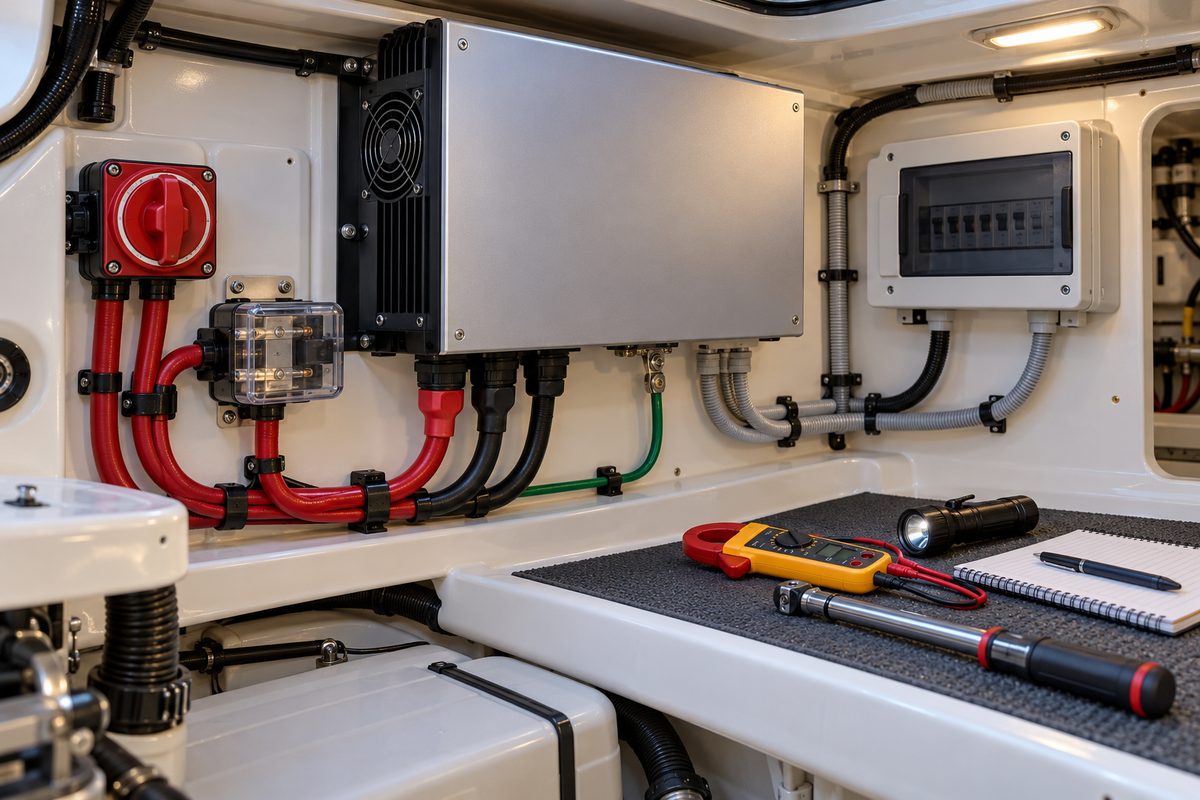
Record the manufacturer, model, serial number, DC input voltage, continuous rating, remote-panel model, battery chemistry, firmware version if displayed, and the date settings were last reviewed. Locate the installation and owner’s manuals, wiring diagram, DC fuse, DC disconnect, AC input breaker, AC output breaker or subpanel, chassis-ground connection, and all possible AC sources.
Do not infer wiring from the front-panel lights. An inverter/charger may pass shore or generator power through its transfer relay even when the inverter function appears off. A remote control may also command the unit, and an automatic generator-start or energy-management system may energize connected equipment.
Isolate Both AC and DC Sources
Plan the shutdown from the boat’s documented source diagram. Common steps include:
- Turn off or unplug sensitive AC loads.
- Disable inverter output with the approved control.
- Disconnect shore power.
- Stop the generator and disable automatic start.
- Open the inverter’s AC input and output breakers where specified.
- Open the dedicated DC disconnect or remove DC protection only by the manual’s procedure.
- Disable solar, alternator, DC-to-DC, and other charging sources that can energize the battery bus.
- Wait the manufacturer’s stated discharge time.
- Verify absence of hazardous voltage with properly rated instruments if any enclosure will be opened.
Switch positions are not proof of isolation. A qualified marine electrician should verify the system before exposed-conductor work. Never place a metal tool across inverter DC terminals; a battery bank can supply destructive fault current even though its nominal voltage seems low.
Xantrex’s Freedom SW guidance warns that internal capacitors remain charged after power is disconnected and that the unit has no owner-serviceable internal parts. Victron likewise requires secure grounding and model-specific fusing and cable sizes. Those principles apply broadly, but the exact disconnection sequence belongs to the installed product.
Inspect the Mounting Location and Ventilation
Heat is a common cause of reduced inverter output and premature component stress. The unit needs the clearances, orientation, and ambient conditions specified in its installation manual. Do not treat an inverter as a shelf or cover it with lines, spare parts, clothing, or insulation.
With all sources isolated, inspect:
- air intakes, exhaust openings, fan grilles, and heat sinks for dust and lint;
- the required clearance on every ventilated side;
- loose mounting hardware, cracked brackets, or vibration marks;
- evidence of water drips, condensation, salt residue, or bilge vapor;
- heat discoloration on the enclosure or nearby surfaces;
- oil mist, fuel residue, cleaning chemicals, or stored corrosives;
- rodent or insect debris;
- cables pressing against sharp edges or blocking airflow; and
- a drip shield or protective enclosure required by the product’s marine listing.
Clean only as the manufacturer allows. A soft brush and controlled vacuum outside the grille may be appropriate; compressed air can drive debris deeper, overspeed a fan, or distribute conductive dust. Never spray solvent, contact cleaner, water, or corrosion inhibitor into an inverter.
An inverter should not be moved into a gasoline engine space simply to shorten cables. Ignition-protection requirements, ventilation, drip protection, temperature, and access must all be evaluated for the specific listed product and boat.
Check Cooling Fans Without Reaching Inside
Some fans run only under load, while charging, or above a temperature threshold. Review the season’s behavior and any over-temperature faults. With the unit closed and the system safely recommissioned for testing, confirm that fans start when the manufacturer’s test or a controlled load calls for them.
Listen for scraping, cycling, excessive vibration, or a fan that starts slowly. A stopped fan, blocked sensor, or degraded bearing can cause derating or shutdown. Do not defeat a grille or spin a fan with a tool. If the fan is replaceable, follow the service manual or use an authorized technician; disconnecting power does not eliminate stored-energy hazards inside the case.
Inspect High-Current DC Cables, Fuse, and Disconnect
An inverter can draw very high DC current. Cable size, length, lug quality, overcurrent protection, and connection resistance therefore have a direct effect on performance and fire risk. Victron’s Wiring Unlimited explains that every battery-connected consumer needs appropriate protection and that large inverters require carefully sized DC conductors. Use the inverter manual and applicable marine electrical standards for the actual design.
With power isolated and no exposed energized parts, visually inspect the positive and negative cable runs from battery or busbar to inverter. Look for:
- insulation that is cut, abraded, swollen, brittle, or heat-darkened;
- unsupported cable weight on a terminal;
- tight bends that strain a lug;
- terminals lacking protective boots or barriers;
- green or white corrosion products;
- a lug that has rotated, crept, or left a heat shadow;
- mismatched conductor sizes in parallel installations;
- an incorrect, cracked, corroded, or overheated fuse and holder;
- a DC disconnect with discoloration, stiffness, or a loose mount; and
- cables sharing sharp or hot routes with exhaust, fuel, or moving parts.
Do not retorque a live connection. Do not guess a torque value, replace a fuse with a higher rating, or add washers that reduce lug contact. If the manual calls for periodic terminal-torque inspection, use a calibrated torque tool and the published value after complete isolation. A loose high-current connection can produce heat without drawing enough current to open the fuse.
Where historical data or safe professional testing is available, compare voltage at the battery and inverter terminals under a controlled load. Excessive drop can indicate undersized cable, a poor lug, a failing switch, or a high-resistance fuse holder. Infrared images may reveal relative hot spots, but they do not prove a connection is safe and must be taken only under controlled, closed-cover operating conditions.
Verify the DC Fuse Matches the Battery System
The fuse must protect the conductor and interrupt the prospective fault current from the installed battery bank. Battery chemistry matters: some lithium banks can deliver far higher short-circuit current than a comparable lead-acid bank. Fuse voltage rating, continuous current, time-current behavior, and interrupt rating all matter.
Do not change fuse type because another style fits the holder or is available locally. Confirm the manufacturer’s specification and the system designer’s calculation. In multi-inverter installations, protection and cable symmetry can be more complex; Victron recommends model-specific design and individual protection where applicable. Have a qualified designer review any installation that has been expanded, converted to lithium, or fitted with a larger inverter without a full protection study.
Inspect Accessible AC Input, Output, and Transfer Components
The AC side may include shore or generator input, a transfer relay inside the inverter/charger, an inverter-fed subpanel, branch breakers, leakage protection, and neutral-ground switching. External checks can reveal problems without opening the unit.
Inspect accessible cable jackets, glands, conduit, strain reliefs, covers, labels, breakers, and subpanel hardware for chafe, looseness, water tracks, corrosion, and overheating. Confirm that no extension cord, household power strip, or improvised plug has been made part of permanent wiring. Verify that circuits intended to be inverter-fed are clearly identified and that high-load equipment excluded by design remains excluded.
A transfer relay can pass incoming AC while the inverter is disabled. Perform only the functional transfer test in the owner’s manual:
- Begin with a stable shore or generator source and normal user-accessible covers in place.
- Confirm the expected input status and that selected loads operate.
- Remove the AC source by the approved control.
- Verify that the intended loads transfer to inverter supply and unintended loads remain off.
- Restore the AC source.
- Confirm normal retransfer and charging behavior.
Use modest, known loads for the test. Do not intentionally overload the inverter or repeatedly switch a marginal generator. Flicker, relay chatter, long transfer delay, reverse-polarity indication, leakage-protection trips, or loss of one circuit requires diagnosis.
Do Not Improvise Neutral-to-Ground Switching
Grounding and neutral bonding are safety functions, not performance tweaks. A marine inverter installation must maintain an equipment-grounding path and, depending on its topology, establish or remove a neutral-to-ground connection when sources change. Some inverter/chargers contain an automatic ground relay; others require external switching or a system-specific configuration.
Never add a neutral-ground jumper because a receptacle tester shows an “open ground” while the inverter is operating. Never remove a factory bonding or grounding conductor to stop nuisance trips. The correct arrangement depends on shore power, generator, inverter model, transformer, transfer equipment, and applicable codes. An error can energize metal parts, defeat leakage protection, create parallel current paths, or cause corrosion.
Inspect the external chassis-ground conductor for physical damage, corrosion, proper support, and an intact connection. Electrical continuity, transfer logic, and leakage-protection testing belong to a qualified marine electrician with the boat’s wiring diagram and product manuals.
Review Settings Without Guessing
An inverter/charger may store settings for battery chemistry, charge voltage, charge current, low-voltage shutdown, restart voltage, shore-current limit, power-assist behavior, search mode, generator acceptance, transfer sensitivity, and remote controls. Firmware updates can also change menus or behavior.
Photograph or export the current configuration before changing anything. Compare it with:
- the exact battery manufacturer’s current charging limits;
- the inverter/charger manual;
- the battery-management-system requirements;
- the generator’s stable output limits;
- shore inlet and circuit ratings; and
- the documented system design.
Do not choose a lithium preset solely because the battery label says “lithium,” and do not copy voltage thresholds from another boat. The battery’s chemistry, series/parallel arrangement, temperature protection, BMS communication, and charge-source coordination must match.
If settings have changed unexpectedly, investigate access control, firmware, remote commands, restored defaults, and service history. Record every intentional change and its reason.
Check Fault History and Remote Controls
Before clearing fault logs, record active and historical alarms. Repeated low-battery, overload, high-temperature, AC-input, relay, fan, or communication faults provide a trail that a one-time dock test may miss.
Inspect the remote display, network cables, terminators, data connectors, and mounting for moisture or damage. Confirm that “off,” “charger only,” “inverter only,” and “on” states mean what the manual says. Some remote controls can override a local switch; some software settings can prevent local startup; and some integrated systems can restart automatically after a fault.
Update firmware only when the manufacturer recommends it for the exact hardware and you have preserved settings and recovery instructions. Storage day is not the time for an unplanned update if failure would leave the charging system unusable.
Perform a Controlled Inverter Load Test
After inspection and correct recommissioning, test with all guards and covers installed. Start with a small resistive load and observe DC voltage, AC output, fan behavior, noise, and fault indications. Then use one or more representative loads within the inverter’s continuous rating and the boat’s design.
Motor and compressor loads can have starting surges much higher than their running watts. A coffee maker, heater, air conditioner, refrigerator, microwave, or power tool may behave differently even when its nameplate appears acceptable. Do not build a test load by plugging in every appliance at once.
Confirm:
- stable AC output and normal indicated voltage and frequency;
- acceptable battery voltage and no BMS trip;
- no abnormal cable, fuse-holder, or disconnect heating;
- normal fan operation;
- correct low-battery and overload behavior only by the manual’s safe test method;
- proper transfer back to shore or generator power; and
- no unexpected energization of excluded circuits.
Stop immediately for burning odor, smoke, arcing, buzzing, relay chatter, repeated trips, rapidly falling battery voltage, or an abnormal hot spot.
Choose the Correct Storage State
The correct winter storage mode depends on the battery bank, charger, shore-power reliability, temperature, and supervision. Possibilities include leaving an inverter/charger in an approved maintenance-charge mode, using “charger only,” switching the inverter off while another charger maintains the bank, or fully isolating the unit and battery bank.
Do not leave inverter mode enabled by habit. A small phantom or remote-controlled load can discharge the bank, and an inverter may restart after low-voltage shutdown when voltage recovers. Conversely, turning off every charging source can damage batteries that require maintenance charging.
Follow the inverter and battery manufacturers’ storage instructions. Confirm whether the unit needs continuous network power, whether lithium batteries permit low-temperature charging, and what happens after a shore-power interruption. Disable automatic generator start unless the storage plan explicitly supports unattended operation. Label all switches and record the final state.
Spring Recommissioning
Before restoring power, inspect for condensation, pest damage, loose covers, and new corrosion. Confirm battery voltage and condition, reinstall any removed fuse or terminal cover using the documented procedure, and verify that cooling openings are clear.
Restore DC and AC sources in the manufacturer’s order. Watch the first startup for faults, unexpected fan behavior, or an automatic transfer. Recheck saved settings, battery communication, and shore-current limit. Perform the modest load and transfer tests again, then inspect external cables and protection for heat or odor.
Marine Inverter Maintenance Checklist
- Identify the inverter, remote, battery system, firmware, and wiring diagram.
- Locate every AC source, DC source, breaker, fuse, disconnect, and automatic control.
- Isolate AC and DC safely and observe the stated capacitor discharge time.
- Inspect mounting, clearances, ventilation, fans, moisture, and contamination.
- Inspect DC cable insulation, support, lugs, boots, fuse holder, and disconnect.
- Confirm fuse type and interrupt rating remain appropriate for the battery bank.
- Inspect accessible AC cables, glands, strain reliefs, breakers, and labels.
- Verify chassis-ground condition without altering neutral-ground bonding.
- Record settings, firmware, remote status, and fault history before changes.
- Test fan operation, controlled loads, and AC transfer with covers installed.
- Stop for heat, odor, arcing, chatter, repeated trips, or unstable voltage.
- Select the storage state from the inverter and battery manuals.
- Label controls and repeat startup, load, and transfer tests in spring.
Record Inverter Service in BoatDuty
Log the inspection date, inverter and remote models, serial number, firmware version, battery chemistry and capacity, DC cable sizes, fuse type and rating, disconnect type, terminal torque values used by a qualified person, ventilation findings, fault history, configuration changes, tested loads, minimum observed battery voltage, transfer-test result, repairs, and final storage state.
A clear BoatDuty record is especially useful after a battery conversion, firmware update, or recurring fault. It preserves the system’s known-good configuration and provides a technician with evidence instead of a vague report that the inverter “sometimes shuts off.”
Sources
- Victron Energy, MultiPlus-II / Quattro-II Manual, current edition (marine grounding, dedicated battery system, fusing, cable sizing, transfer operation, and installation safety)
- Victron Energy, Wiring Unlimited (DC conductor sizing, fuse placement, connection quality, isolation, and multi-inverter wiring)
- Victron Energy, Inverter Smart Manual (protective grounding, ambient conditions, and model-specific installation)
- Xantrex, Freedom XC PRO Inverter/Charger Owner’s Guide (marine operation, configuration, maintenance, and troubleshooting)
- Xantrex, Freedom SW Inverter/Charger Owner’s Guide (stored-energy warning, AC/DC isolation, no owner-serviceable internal parts, and operating safety)
- Xantrex, Freedom XC PRO Marine Inverter/Charger (current marine product documentation and applicable manual links)