

Marine battery switch maintenance before storage is easy to overlook because a selector or disconnect switch often keeps working until resistance, corrosion, or a loose high-current connection becomes severe. Yet this compact component may carry starter current, connect house loads, isolate a battery bank, or combine banks for emergency starting. A poor connection can cause slow cranking, intermittent electronics, unwanted voltage drop, heat damage, or a switch that cannot isolate power when it is needed most.
Fall layup is a useful time to inspect the switch while the boat is quiet and the batteries can be safely isolated. The goal is not to rebuild a sealed switch. It is to verify that the correct marine-rated switch is secure, its operating positions make sense, its cables and terminals show no distress, and its behavior still matches the boat’s wiring plan.
Battery systems vary widely. A small boat may have one ON/OFF disconnect. A two-bank installation may use a 1–2–BOTH selector, separate start and house switches, a Dual Circuit switch, an automatic charging relay, or remote battery switches. Always identify the exact components and follow the boatbuilder’s wiring diagram and each manufacturer’s instructions.
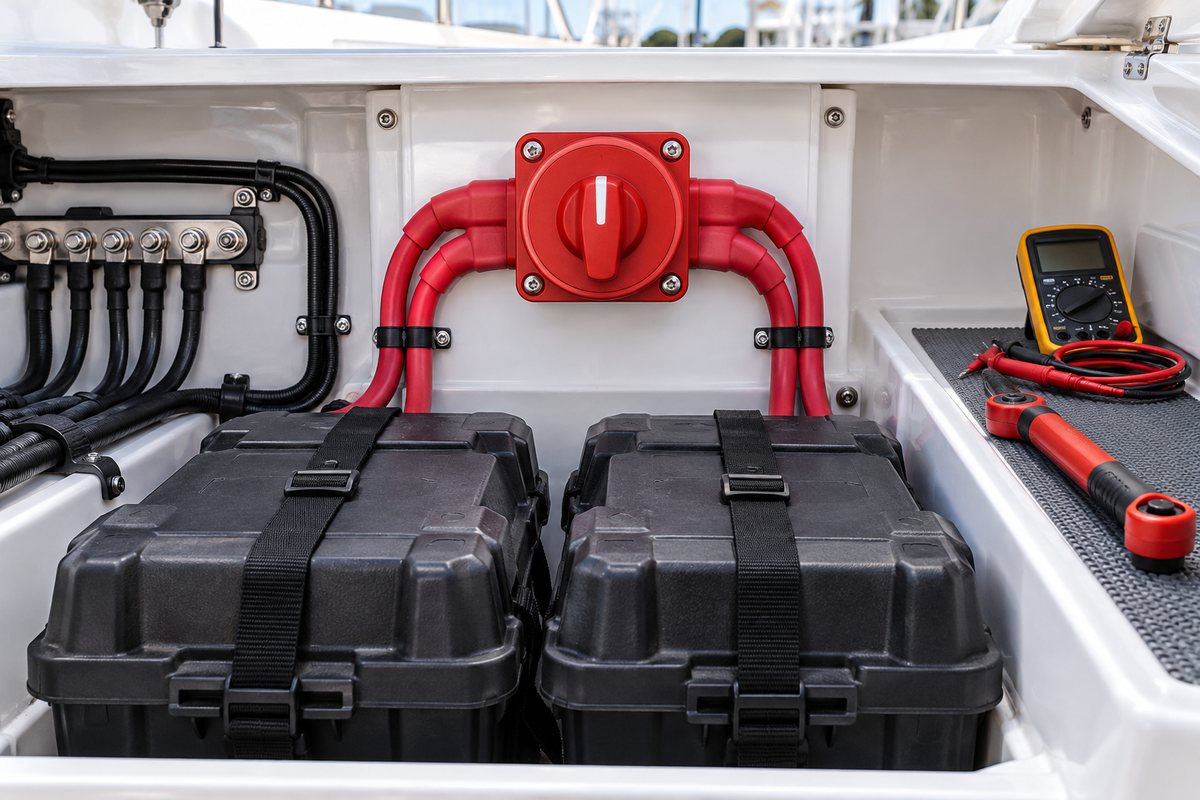
Why the battery switch deserves a close inspection
A battery switch handles much more current than an ordinary dashboard switch. The internal contacts and external studs must carry that current without excessive resistance. A slightly loose terminal can create heat under load even when the connection appears normal with everything turned off.
The switch also has a safety role. It should let the operator isolate intended circuits, but some equipment may be wired to remain powered when the switch is OFF. Automatic bilge pumps, alarms, chargers, and memory circuits are common examples, depending on the boat. Maintenance should therefore begin with an accurate understanding of what the switch actually controls.
Manufacturer specifications are model-specific. Blue Sea Systems, for example, publishes different terminal-stud torque values and current ratings for its m-Series, e-Series, and HD-Series switches. Never copy a torque value from a switch that merely looks similar. Record the exact part number, terminal size, and specified torque before loosening or tightening anything.
Start with a wiring map, not a wrench
Before disconnecting power, photograph the switch face, cable routing, battery-bank labels, and any nearby fuses or automatic charging relay. Write down every selector position and what the owner’s manual says it should do.
Look for a label or molded part number on the switch. Use that identifier to retrieve the current installation instructions. Confirm:
- Switch type: ON/OFF, 1–2–BOTH, Dual Circuit, Dual Circuit Plus, or remote-operated
- Maximum system voltage and continuous, intermittent, and cranking ratings
- Terminal-stud size and manufacturer-specified torque
- Whether the switch is make-before-break between selected battery positions
- Whether it includes an alternator-field-disconnect feature
- Required terminal covers, mounting orientation, and cable-clearance limits
Do not assume every rotary switch can be moved through every position while the engine is running. Some selector switches use make-before-break contacts between battery selections, but turning a charging system to OFF can disconnect the alternator from the battery and damage alternator diodes unless the installation is specifically designed to prevent that. Follow the operating instructions for the installed switch and charging system.
Make the battery-switch inspection safe
Battery cables can deliver enough fault current to melt tools and start a fire. If the switch is in a gasoline engine or fuel-vapor space, replacement equipment must also retain the required ignition-protection rating.
Before opening a switch enclosure or touching a terminal:
- Turn off engines, generators, inverters, chargers, solar charging, shore power, and all DC loads.
- Follow the boatbuilder’s shutdown sequence for equipment that needs a controlled power-down.
- Remove jewelry and keep uninsulated tools away from battery terminals.
- Provide ventilation and keep sparks, flames, and smoking materials away from batteries.
- Disconnect battery cables using the procedure in the boat and battery manuals. If the wiring arrangement is unclear, stop and use a qualified marine electrician.
- Verify the circuit is de-energized with a suitable meter before removing a rear cover or terminal boot.
- Secure loose cable ends so they cannot spring back against a terminal or grounded metal.
Never rely on the rotary handle position alone as proof that the back of the switch is safe to touch.
Inspect the switch face, enclosure, and mounting
Begin with the parts visible from the operating side.
The handle should move positively into each intended detent without scraping, binding, unusual looseness, or a vague halfway position. Confirm that OFF and each bank or circuit position remain legible. A missing or misleading label is a maintenance problem because it invites incorrect operation.
Inspect the case for cracks, distortion, melted areas, soot, or discoloration. Heat damage around the handle or fasteners can indicate an internal contact problem or an overheated rear connection. Check that the switch is firmly mounted and that the panel does not flex when the handle is turned.
Also inspect the location. Water should not drip onto the switch, and stored gear should not strike the handle or cable enclosure. A remote switch should have a known manual-override procedure and unobstructed access to that override.
Inspect the rear terminals and heavy cables
Only after the system is safely de-energized should the rear cover or terminal protection be opened.
Look for:
- Loose, missing, or damaged terminal boots and insulating covers
- Green or white corrosion products on cable lugs, studs, washers, or nuts
- Darkened insulation, blistered boots, softened plastic, or heat-discolored metal
- Cable lugs that can rotate on the cable or show broken strands at the barrel
- Cables pulling sideways on switch studs
- Tight bends that violate the cable manufacturer’s minimum bend radius
- Abrasion where cables pass through bulkheads or touch sharp edges
- Unsupported cable weight hanging from a terminal
- Stacked lugs or hardware that do not match the manufacturer’s installation drawing
- Moisture tracks, salt deposits, or evidence that the enclosure has been submerged
Most common battery systems switch the positive conductors and place battery negatives on a common negative bus, but specialized systems can differ. Do not “correct” a cable color or connection based only on a general rule. Compare the actual installation with its diagram.
If a connection must be serviced, clean and reassemble it using the approved hardware sequence and the exact torque for that model. Do not turn the switch stud while tightening the nut. Excess torque can damage the case or internal connection; insufficient torque can allow resistance and heat. Replace compromised cable lugs with properly sized, marine-grade components installed with the correct crimping process. Do not conceal corrosion or a loose crimp with sealant.
A manufacturer-approved marine battery-terminal protectant may be applied as directed after the electrical connection is clean, dry, correctly assembled, and torqued. Protectant is not a substitute for repair.
Test the switch without guessing
After reassembly, restore power in the correct sequence and confirm normal operation before storage.
With engines off, test each intended position using low-risk loads. Verify that:
- OFF removes power from the circuits it is supposed to isolate
- Any intentionally unswitched circuits remain operational
- Each bank position energizes the expected loads
- A combine or BOTH position behaves as documented
- The handle remains in its detent and the enclosure does not move
Do not perform repeated starter tests just to prove the switch works. If the boat has shown slow cranking, dimming, intermittent resets, or hot-cable symptoms, a technician can perform a voltage-drop test across the switch and connected cables while the circuit is carrying a controlled load. A static resistance check on a de-energized high-current circuit may not reveal a connection that fails only under load.
An infrared thermometer can help compare terminal temperatures after a normal operating period, but temperature alone is not a pass/fail specification. Uneven heating, a hot-plastic smell, or a terminal that is conspicuously warmer than equivalent connections deserves investigation. Never open an energized cover to obtain a temperature reading.
Treat these findings as repair items
Replace or professionally evaluate a switch when you find:
- Cracked, melted, swollen, or charred housing material
- A handle that binds, slips, or will not remain in position
- Burned or pitted terminal hardware
- Recurring loose connections after correct assembly
- Heat damage in a cable or lug
- Water intrusion inside a supposedly protected enclosure
- Evidence of internal arcing
- Ratings that do not match the installed system or cranking load
- A non-ignition-protected replacement in a location that requires ignition protection
A battery switch is not a good candidate for improvised internal repair. Many units are sealed, and their safety and current ratings depend on the intact enclosure and contact design.
Prepare the battery switch for storage
The correct storage position depends on the boat’s electrical design. Many boats are stored with manual battery switches OFF, but bilge pumps, security systems, battery chargers, solar controllers, or monitoring equipment may have intentional direct battery connections. Some boats remain afloat and require essential automatic circuits to stay active.
Use the boatbuilder’s storage procedure rather than a blanket rule. Confirm charger settings and battery-storage requirements separately. Attach a temporary note if a cable remains disconnected or a normal circuit has been intentionally disabled for layup.
Marine battery switch maintenance checklist
- Record switch manufacturer, model, type, and ratings
- Photograph the switch face, labels, cable routing, and rear connections
- Confirm the operating diagram and safe switching sequence
- Shut down all AC and DC charging sources and loads
- Disconnect and verify de-energization using the approved procedure
- Check the handle, detents, labels, enclosure, and mounting
- Inspect terminal covers, studs, nuts, lugs, and cable support
- Look for corrosion, moisture, abrasion, discoloration, and heat damage
- Use only the model-specific terminal torque and hardware sequence
- Restore protection over every high-current terminal
- Test OFF and each intended operating position with engines stopped
- Confirm intentionally unswitched safety circuits
- Investigate voltage-drop or abnormal-temperature clues
- Set the switch to the documented storage position
Keep a useful service record in BoatDuty
Record the inspection date, engine hours if relevant to the boat’s maintenance schedule, switch manufacturer and part number, terminal torque specification, cable or lug repairs, protectant used, test results, and storage position in BoatDuty. Add notes about circuits that remain powered with the switch OFF and any symptoms that need spring follow-up.
That record turns a hidden electrical component into a traceable maintenance item. At recommissioning, you can confirm that temporary disconnections were restored, review prior heat or voltage-drop concerns, and avoid repeating the same diagnosis.
Supporting sources
- Blue Sea Systems, e-Series Selector Battery Switch product page, operating features, installation documents, ratings, terminal torque, and FAQs
- Blue Sea Systems, m-Series Dual Circuit Plus battery switch specifications and installation resources
- Blue Sea Systems, battery switch instructions library
- Blue Sea Systems, battery management wiring schematics for typical applications
- Blue Sea Systems, Add-A-Battery installation and operating guidance, including battery-work safety