

Marine battery charger maintenance before storage is more than confirming that a charging light turns on. An installed charger must match the battery bank, receive safe AC power, deliver protected DC output, shed heat, and transition through the charging stages expected by the battery manufacturer. A loose lug, blocked cooling path, wrong battery profile, or failing temperature sensor can quietly shorten battery life or create an electrical hazard.
This guide covers permanently installed low-voltage battery chargers used on recreational boats. It does not cover alternator regulators, solar controllers, portable automotive chargers, electric-propulsion battery systems, or the internal repair of inverter/chargers. Combined inverter/chargers can contain hazardous energy from multiple sources even after shore power is removed. Follow the boatbuilder, charger, inverter, battery, and battery-management-system manuals, and use a qualified marine electrician when access extends beyond external inspection and testing.
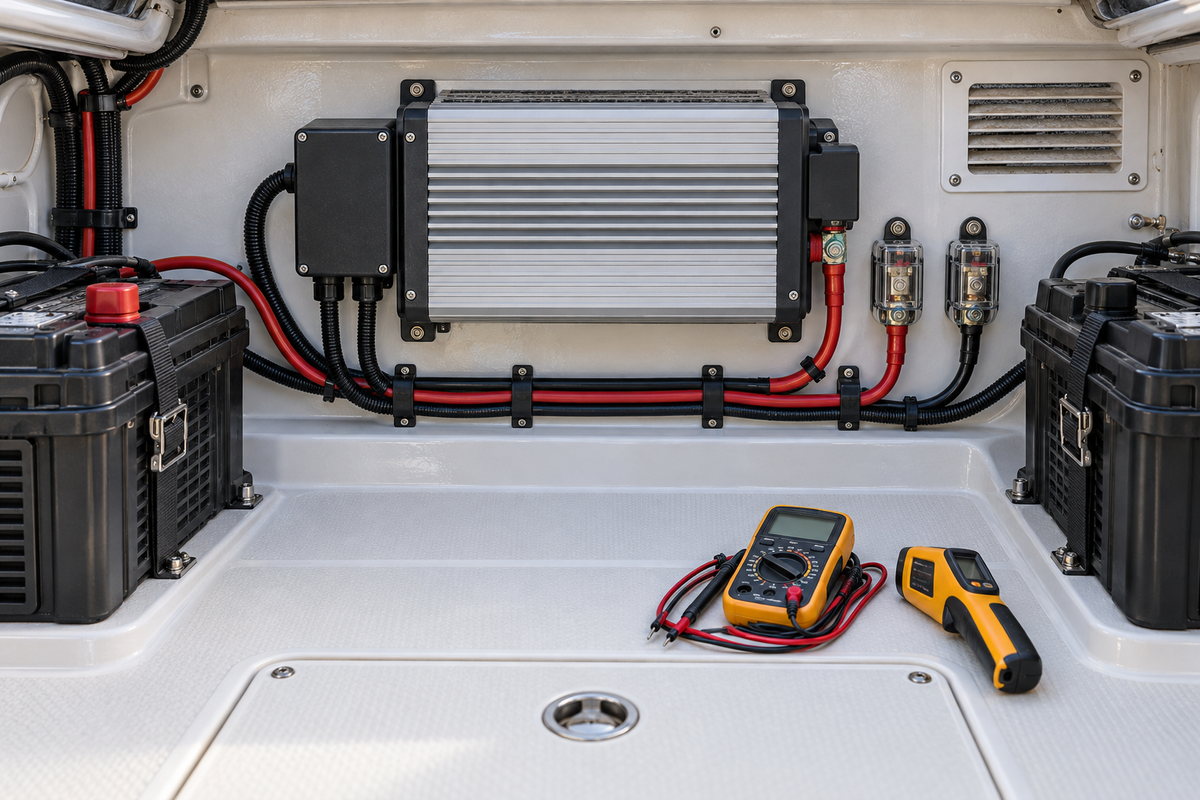
Identify the Charger and Every Energy Source
Start by recording the charger's manufacturer, model, serial number, AC input rating, DC output voltage and current, number of outputs, ignition-protection status, and supported battery types. Locate the current manual and wiring diagram rather than relying on labels left by a previous owner.
Map every connected source:
- Shore-power AC input
- Generator AC input
- Inverter or inverter/charger transfer system
- Battery banks and individual charger outputs
- Alternator, solar, wind, and DC-to-DC charging sources
- Battery switches, remote controls, network modules, and temperature or voltage-sense leads
The front switch on some chargers does not disconnect the internal mains supply. Victron's Skylla-TG manual, for example, explicitly warns that its front on/off switch does not switch off mains power. Isolation procedures are model-specific.
De-Energize Before Opening or Touching Connections
Do not remove a charger cover or touch terminations while assuming the unit is safe. AC input and battery-fed DC output can both remain present, and internal capacitors may retain charge.
For an external inspection:
- Turn off connected loads as the equipment manuals require.
- Disconnect shore power and secure the shore-power source.
- Disable the generator and automatic generator start.
- Shut down the inverter/charger and other charging sources.
- Follow the battery or battery-management-system isolation procedure.
- Verify absence of voltage at the conductors you may touch, using a properly rated meter proved before and after the test.
- Observe the manufacturer's waiting period before removing any authorized terminal cover.
Do not open the main electronics enclosure unless the manual identifies it as an owner-serviceable action. Victron manuals for some chargers state that internal cover removal is for qualified technicians and warn of dangerous voltage on internal parts. An apparently simple cleaning job is not a reason to defeat that boundary.
Inspect Mounting, Ventilation, and the Compartment
Chargers generate heat. Even a waterproof model needs the mounting orientation, clearances, and environmental protection specified by its manufacturer.
Inspect for:
- Loose mounting fasteners or a cracked mounting surface
- Blocked fans, cooling fins, louvers, or natural-convection paths
- Dust, lint, pet hair, insect nests, or stored gear against the enclosure
- Water tracks, condensation, salt deposits, corrosion, or a leaking deck fitting above
- Fuel, solvent, cloth, or other heat-sensitive material stored nearby
- Discoloration of the enclosure or adjacent bulkhead
- A compartment temperature or airflow problem
Victron's charger safety guidance calls for good airflow, unobstructed space, protection from water, moisture, dust, and direct sunlight, and avoidance of sealed battery compartments where explosive gases may collect. Installation requirements vary, especially for ignition-protected or fan-cooled models, so use the exact manual.
Clean only the exterior with the methods permitted by the manufacturer. Do not drive compressed air, liquid cleaner, or a brush through vents into live electronics. Correct the source of moisture instead of spraying corrosion inhibitor over the evidence.
Check the AC Input Without Repeating Shore-Power Maintenance
The charger is an AC load, but this inspection is limited to the charger and its protected supply—not general shore-power cord or plug maintenance.
With the system isolated, inspect the accessible charger input enclosure, strain relief, cable support, equipment grounding conductor, branch-circuit protection, and any approved disconnect. Look for heat discoloration, loose hardware, damaged insulation, water intrusion, and improvised splices.
Confirm that:
- The AC supply voltage and frequency match the charger's rating
- The charger is protected by the type and rating required by the installation design
- The equipment grounding connection follows the charger and boatbuilder diagrams
- Cable entries remain sealed or bushed as designed
- The cable is supported so the terminal does not carry mechanical strain
Do not tighten AC terminals by feel or work inside an energized panel. Torque specifications and access limitations are model-specific. If an AC connection has overheated, inspect and test the full supply path; replacing only a discolored terminal may leave the cause in place.
Inspect DC Output Cables, Protection, and Sense Leads
Charger performance depends on low-resistance DC connections. A poor lug can create voltage drop and localized heat, leading the charger to read a different voltage than the battery actually receives.
Inspect each output from the charger to its battery or distribution point:
- Correct positive and negative polarity
- Properly crimped, tinned-copper terminals where specified
- Intact insulation and sealed heat-shrink
- No darkened copper, green corrosion, or stiff cable beneath the insulation
- Secure support, chafe protection, and suitable bend radius
- Terminal covers over exposed positive connections
- Correct output fuse or circuit breaker near the battery where required
- No unauthorized stacks of lugs on a terminal
- Secure temperature-sensor and voltage-sense wiring
Victron's Blue Smart documentation instructs installers to isolate the DC system before making connections, confirm polarity, use overcurrent protection where required, and torque terminations to the manufacturer's specification. ProMariner and other marine charger manufacturers provide model-specific installation diagrams and cable, fuse, and mounting requirements.
If a connection is corroded, determine whether electrolyte, condensation, a wet cable, or an unsealed terminal is responsible. Replace heat-damaged or deeply corroded components; do not hide deteriorated strands under new heat-shrink.
Verify Battery Type and Charge Settings
A charger cannot protect a battery if its profile is wrong. Confirm the settings against the current battery manufacturer's requirements—not merely the chemistry name printed on an old label.
Record for each bank:
- Battery chemistry and exact model
- Nominal voltage
- Capacity and bank configuration
- Manufacturer-recommended absorption, float, storage, and equalization behavior
- Temperature-compensation or low-temperature charging requirements
- Whether a battery-management system controls charge permission
- Charger output assigned to that bank
Flooded lead-acid, AGM, gel, and lithium iron phosphate batteries can require different limits and behavior. Some sealed batteries must not be equalized. Lithium batteries may prohibit charging below a specified temperature unless the battery system provides suitable protection. Do not enable a “recondition,” equalize, or lithium mode based on a generic assumption.
When batteries have been changed, verify that remote panels, app settings, DIP switches, and networked system settings were updated. A replacement bank with different capacity or chemistry may require more than moving a selector.
Examine Temperature and Voltage Sensing
Remote sensors help a charger make better decisions, but a failed or poorly installed sensor can produce misleading results.
Check that:
- The battery-temperature sensor is attached at the specified location
- Its cable is undamaged and routed away from interference and chafe
- A voltage-sense lead is fused and connected as the manual specifies
- Networked battery data comes from the intended source
- Sensor values are plausible compared with independent measurements
Do not substitute one manufacturer's sensor for another or extend a sensor cable without approval. If a charger reports implausible temperature or voltage, diagnose the sensor, connector, configuration, and actual bank condition before assuming the charger itself has failed.
Clean Fans and Cooling Paths Carefully
Fan-cooled chargers can accumulate dust that raises operating temperature. With the charger fully isolated and only if the manual permits owner cleaning, remove loose dust from accessible guards and exterior fins using a soft brush or low-suction vacuum. Prevent the fan from overspeeding during cleaning.
Replace a noisy, stalled, cracked, or intermittent fan only with the specified part and procedure. A fan fault can cause current derating or thermal shutdown. Do not bypass a thermal sensor, enlarge a vent, or operate the charger with its cover removed.
Test Charging Performance Under Controlled Conditions
After reassembly, restore the system in the sequence specified by the battery and charger manufacturers. Make sure battery compartments are ventilated and no tools remain near terminals.
Observe startup and record:
- Battery voltage before charging
- AC input status
- Charger mode or stage
- Output voltage at the charger and at the battery
- Output current when available
- Battery temperature
- Remote-panel or network status
- Warnings, fault codes, fan behavior, odor, or unusual sound
A healthy charger may not immediately deliver its nameplate current. Output depends on battery state of charge, battery acceptance, temperature, connected DC loads, input voltage, profile, and programmed limits. Compare behavior with the model manual rather than using one generic number.
Measure voltage drop across the positive and negative paths while current is flowing if you are qualified to conduct energized testing. Record current and the exact test points. A normal-looking cable can conceal resistance at a crimp, fuse holder, disconnect, or return connection.
Use an infrared thermometer or thermal camera only with appropriate electrical controls. Compare similar terminations under stable load and account for surface emissivity. A hot spot is a clue requiring diagnosis, not proof that tightening the nearest nut will solve the problem.
Understand Common Charger Symptoms
Charger shows power but no output
Possible causes include a full battery, open output fuse, disconnected bank, battery voltage outside the charger's recognition range, BMS charge prohibition, wrong mode, remote shutdown, or an internal fault. Check status codes and the troubleshooting table before replacing the charger.
Charger stays in a high-voltage stage too long
Investigate heavy DC loads, a failing or oversized bank, poor voltage sensing, wrong profile, temperature-sensor faults, or a battery that is not accepting charge normally. Long high-stage operation can also be a symptom of a connection problem between charger and battery.
Charger cycles, derates, or shuts down
Blocked ventilation, high compartment temperature, low AC input, fan failure, overload, incorrect wiring, or protective operation may be involved. Preserve fault logs and measure conditions when the symptom occurs.
One bank charges differently
Confirm output assignment, fuse continuity, cable condition, bank voltage, battery age, and whether outputs are independently regulated. Some multi-output chargers share a common charging algorithm; others monitor outputs differently. The manual explains what “independent” means for that model.
Decide the Winter Storage Strategy
Do not assume every charger should remain connected all winter. The correct plan depends on charger design, battery chemistry, storage temperature, shore-power reliability, monitoring, and the battery manufacturer's instructions.
Options may include:
- A charger-approved long-term storage or float mode
- Periodic supervised charging
- Battery isolation after full charge
- Removal to a temperature-controlled location
- A lithium-battery storage state specified by its manufacturer
Some chargers are designed for continuous connection, while others have specific storage behavior. Victron's Skylla-TG manual describes continuous connection for that model, but that statement should not be generalized to every charger or battery. If unattended shore power is unreliable, consider the consequences of an outage, a ground-fault trip, a failed charger, or a connected parasitic load.
Marine Battery Charger Maintenance Checklist
- Record the charger model, ratings, outputs, and current manual
- Map AC input, DC outputs, batteries, other charge sources, sensors, and controls
- Isolate AC and DC energy and verify before touching connections
- Inspect mounting, compartment dryness, cooling clearance, fins, and fans
- Check accessible AC input protection, grounding, strain relief, and heat clues
- Inspect every DC output lug, cable, fuse, cover, and return path
- Confirm battery chemistry, model, capacity, and required charge profile
- Verify temperature and voltage-sense installation and plausible readings
- Restore power in the specified sequence
- Record voltage, current, stage, temperature, and fault status
- Investigate voltage drop or abnormal heat under a controlled load
- Select a storage strategy approved for both charger and batteries
Record Charger Service in BoatDuty
Use BoatDuty to log the inspection date, charger model and firmware where applicable, battery models and installation dates, bank capacity, charge-profile settings, cable and fuse specifications, terminal torque values, resting and charging voltages, output current, temperatures, fault codes, parts used, photographs, and the selected winter-storage plan.
That history makes subtle changes visible. Longer absorption time, rising voltage drop, repeat thermal warnings, or corrosion returning at the same lug becomes evidence rather than a vague memory. A well-documented charger inspection protects both the electrical installation and the batteries it is supposed to maintain.