

A remote-control boat spotlight may spend most of the season exposed to sun, spray, vibration, and salt while receiving attention only when it fails to aim or illuminate. A short inspection before winter storage can reveal a cloudy lens, loose base, damaged cable, poor connection, weak movement, or water entry while the boat is still accessible.
This guide covers permanently mounted electric pan-and-tilt searchlights on recreational boats. Portable magnetic lights, handheld spotlights, fixed deck lights, and integrated camera-light systems may require different procedures. Always use the manual for the exact model: voltage, fuse protection, mounting gasket, drainage, movement limits, lamp service, and remote-control setup are not universal.
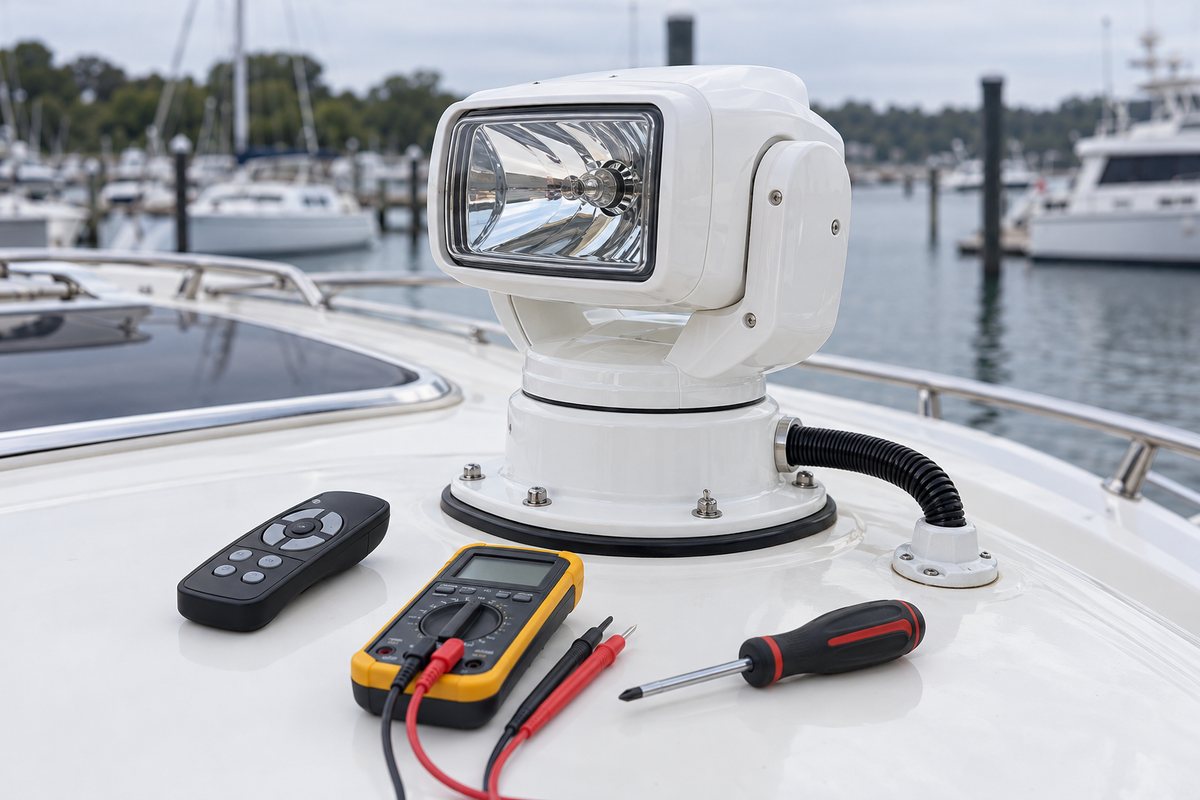
Test the spotlight before taking it apart
Begin with the boat's batteries charged and the spotlight circuit configured normally. From a safe position, switch on the lamp and move it slowly through its usable range. Watch and listen rather than repeatedly driving it against its stops.
Note whether the light:
- Illuminates immediately and maintains steady brightness
- Pans left and right without hesitation, clicking, or grinding
- Tilts up and down smoothly
- Stops, reverses, and parks as the manual describes
- Responds consistently to every wired or wireless control
- Keeps its aim instead of drifting after the control is released
- Produces radio interference, breaker trips, blown fuses, or hot-wire odor
Record the symptoms before disconnecting power. “Dim but moves,” “lights but will not tilt,” and “moves but will not light” point to different diagnostic paths. Jabsco's 255 SL troubleshooting table, for example, directs owners to check source voltage and wire size for a dim lamp, connectors for missing motion directions, and the appropriate fuse or bulb when movement and illumination do not fail together.
Isolate power before inspection
Turn the spotlight off and open its breaker or remove the specified fuse before touching the base, cable, connectors, or lamp. Verify the circuit is de-energized using a method appropriate to the boat. A pan-and-tilt unit can move unexpectedly if a remote is pressed, and a halogen lamp can remain hot after shutdown.
Do not disassemble a sealed drive housing unless the manufacturer provides an owner-service procedure. Opening a unit can disturb gaskets, gear alignment, limit mechanisms, and warranty seals. If the manual directs factory service for internal faults, follow that direction.
Clean the lens and housing gently
Rinse loose salt and grit with fresh water before wiping. Use a soft cloth and the cleaner approved for the lens and housing material. Strong solvents, abrasive pads, dry rubbing, and pressure-washer jets can haze plastic, damage coatings, force water past seals, or remove protective finishes.
Inspect the lens for cracks, chips, clouding, internal condensation, failed perimeter seals, and darkened reflectors. A few external water spots are cosmetic; droplets or fog inside a sealed lamp or housing indicate a sealing or ventilation problem. Do not drill a drain hole or smear sealant over seams unless the manufacturer specifically calls for it.
On halogen models, avoid touching a replacement bulb's glass with bare skin and use the exact lamp specified in the manual. LED modules may not be owner-replaceable. A higher-wattage substitute can overload wiring, overheat the housing, and damage the reflector.
Inspect the pan-and-tilt mechanism without forcing it
Look at the yoke, pivot covers, rotating base, fasteners, and gaps between moving parts. Check for impact marks, cracks, swelling plastic, corrosion trails, sand, fishing line, dried sealant, or hardware that has backed out. Confirm that nothing on the cabin roof blocks the unit's sweep.
Do not rotate or tilt the head by hand unless the manual explicitly permits it. Forced movement can strip gears or disturb position sensing. Likewise, do not spray penetrating oil, grease, or silicone into the housing on the assumption that movement needs lubrication. Many units use sealed gears and engineered plastics; the wrong product can attack seals, trap grit, or contaminate electrical parts.
The Golight GT installation guide illustrates why clearance matters. The covered models rotate 370 degrees and tilt through a defined range, so the mounting location must provide room for the housing and leave the required power-cord slack under the light. Your unit's range and cable arrangement may differ.
Check the base, gasket, and mounting surface
Stand back and confirm the spotlight base sits level and square. Then inspect each mounting fastener, washer, bracket, and gasket for looseness, corrosion, cracks, or movement. Look at the surrounding fiberglass or metal for crazing, compression, lifted paint, and rust or water trails.
A loose base is more than a pointing problem. Repeated motion can enlarge mounting holes, chafe wiring, break a gasket seal, and admit water into cored structure. If the base moves, do not simply tighten every fastener as hard as possible. Identify the fastener type, backing arrangement, deck construction, and specified torque. Wet or crushed core, spinning hardware, and missing backing require a structural repair plan.
Respect the designed drainage path. Golight's GT guide, for example, places a gasket under the mounting bracket and specifically warns that sealant around that gasket can limit proper drainage; it calls for sealing the center power-cord hole instead. Jabsco's 255 SL instructions use a gasket under the light base and call for bedding or sealant at the control. These are model-specific details, not interchangeable recipes.
Inspect the cable entry and external wiring
Follow the cable from the spotlight to the deck entry. Check the outer jacket for sun cracking, flattening, cuts, abrasion, tight bends, pulled strain relief, and contact with sharp edges. The cable should have enough controlled slack for the unit's designed motion without forming a loop that can snag.
Inspect the deck gland or center-hole seal for gaps, loose hardware, hardened sealant, and water tracks. A watertight entry must not clamp the cable so tightly that movement transfers load to internal conductors. Where accessible below deck, look for drips, damp insulation, corrosion, or a hanging cable that needs support.
Jabsco's instructions recommend securing the cable, protecting it at stress points, and leaving adequate slack wherever it must remain flexible. That is a useful general inspection principle even though the exact clips, cable length, and bend allowance must come from the installed model's manual.
Inspect power, circuit protection, and connectors
At the breaker, fuse, control, and accessible connectors, look for loose terminals, green or white corrosion, darkened insulation, overheated plastic, improvised splices, and wire that is unsupported near a terminal. Confirm that circuit protection and conductor size match the manufacturer's instructions; never install a larger fuse to stop nuisance opening.
Model requirements can vary sharply. The Golight GT guide lists different maximum current and recommended fuse values for specified halogen and LED models. Jabsco's 255 SL uses separate lamp and motor fuses in its control. Those examples show why the part number—not appearance—must control the service decision.
If brightness is weak or motion is slow, test source voltage and voltage at the unit under load using the manual's procedure. A normal open-circuit reading can hide resistance at a connector, switch, fuse holder, ground, or undersized wire. Compare the positive and return sides separately if the manual supports voltage-drop testing. Stop if the circuit includes unfamiliar electronics or sealed connectors that should not be probed.
Service wired and wireless controls
Inspect a wired joystick or keypad for cracked boots, sticky movement, missing labels, loose mounting, and water entry. Check the panel seal and rear connector where accessible. If the light moves opposite the command or only in certain directions, verify plug orientation and wiring against the diagram before assuming an internal motor fault.
For wireless remotes, inspect the case, buttons, gasket, battery compartment, and contacts. Replace batteries only with the specified type and polarity, then recycle the old cells appropriately. Clean minor battery-contact residue according to the remote manufacturer's instructions; replace a remote with severe leakage damage.
Pairing and channel procedures are model-specific. Golight's GT guide includes a reprogramming sequence and notes that power cycling initiates a brief code-search phase. Do not repeatedly cycle power or change internal switches without the correct instructions, especially when more than one light is nearby.
Diagnose symptoms in a useful order
When a spotlight fails, use the symptom to narrow the check:
Lamp and movement both fail
Check the main breaker or fuse, source voltage, ground, shared connector, and control power. A failed common supply is more likely than simultaneous lamp and motor failures.
Lamp works but the unit will not move
Check the motor-control fuse or protection, remote or joystick connection, control cable, and model-specific pairing. Grinding, clicking, or partial movement can indicate an obstructed or damaged drive; stop before repeated operation makes it worse.
Unit moves but the lamp is dark
Check the lamp circuit protection, lamp connector, and approved bulb or LED service procedure. Do not energize an open housing in a wet location.
Light is dim or movement is slow
Measure voltage under load and inspect the supply and return path for resistance. Verify conductor size and run length against the manual. A tired battery can contribute, but corrosion, a weak ground, and an overheated fuse holder are common places to look.
Condensation keeps returning
Inspect the lens seal, housing seam, cable entry, base gasket, and any manufacturer-designed vent or drain. Repeated condensation after careful drying calls for seal or housing service, not an improvised vent hole.
Prepare the spotlight for winter storage
After cleaning and testing, let the exterior dry. Correct loose mounting and damaged seals according to the product and boat manuals. Leave the unit in the manufacturer's recommended parked position so the mechanism is not pressed against a stop and the lens is protected from standing water or impact.
If the boat will be covered, confirm the cover cannot rub the lens, press on the housing, or trap a pocket of water around the base. Remove batteries from handheld remotes when the remote manufacturer recommends it, and store the remote in a dry, labeled place. Do not wrap the installed light in an airtight plastic bag; trapped moisture can promote condensation and corrosion.
Restore or isolate circuit power according to the boat's storage plan. Tag any disabled circuit or unresolved fault so it is not forgotten at spring launch.
Remote spotlight maintenance checklist
- Exact model, voltage, manual, fuse values, and lamp type are recorded
- Lamp illuminates steadily at normal brightness
- Pan, tilt, stop, reverse, and park functions behave normally
- Lens and housing are clean, clear, dry, and uncracked
- No condensation or water entry is visible
- Moving joints are unobstructed and have full designed clearance
- Base, gasket, fasteners, and mounting surface are sound
- Cable has correct slack, strain relief, support, and chafe protection
- Deck entry and below-deck area show no leakage
- Breaker, fuses, connectors, ground, and control wiring show no heat or corrosion
- Wired controls and wireless remote operate consistently
- Storage position and cover clearance are confirmed
- Faults and disabled circuits are clearly documented
Record the service in BoatDuty
Record the inspection date, spotlight manufacturer and model, system voltage, fuse sizes, lamp or module part number, remote battery type, measured voltage under load, cleaning products used, and every repair. Note symptoms in precise terms and add the parked position or unresolved fault. A consistent BoatDuty record makes it much easier to compare brightness, movement, and electrical readings next season.